Aero Playground: quick start
The basics on one page. The same guide is in the game: OPTIONS › Help › Quick guide (in a headset, the Quick guide row of the menu). Everything else is in the full manual.
Controls
| Phone / tablet | Keyboard | Gamepad | Headset | |
|---|---|---|---|---|
| Roll, pitch | Right pad (slide down = nose up) | Arrows (↓ = nose up) | Right stick | Right thumbstick |
| Rudder | Left pad, sideways | A D | Left stick, sideways | Left thumbstick, sideways |
| Throttle | Left pad, up / down (stays put) | W S | Left stick up / down | Left thumbstick up / down |
| Brakes | Bottom of left pad | B | X; LT / RT | Triggers |
| Flaps | FLAP | F | D-pad ◄ ► | X / Y |
| Trim | Slider | = - | D-pad ▲ ▼ | A / B |
| Smoke | SMOKE | on screen | B | Right grip |
| Next view | VIEW, CAM | C | Y | Menu › View |
| Reset | Reset | R | on screen | Menu › Reset flight |
| Bail out | BAIL OUT | E | on screen | Menu (choose twice) |
| Pause | OPTIONS | OPTIONS | Start | Menu button |
Tilt flying (phones and tablets): OPTIONS › Controls. The lit TILT FLIES button turns it off. Gliders: the throttle control is the spoilers. More: Controls.
Reading the screen
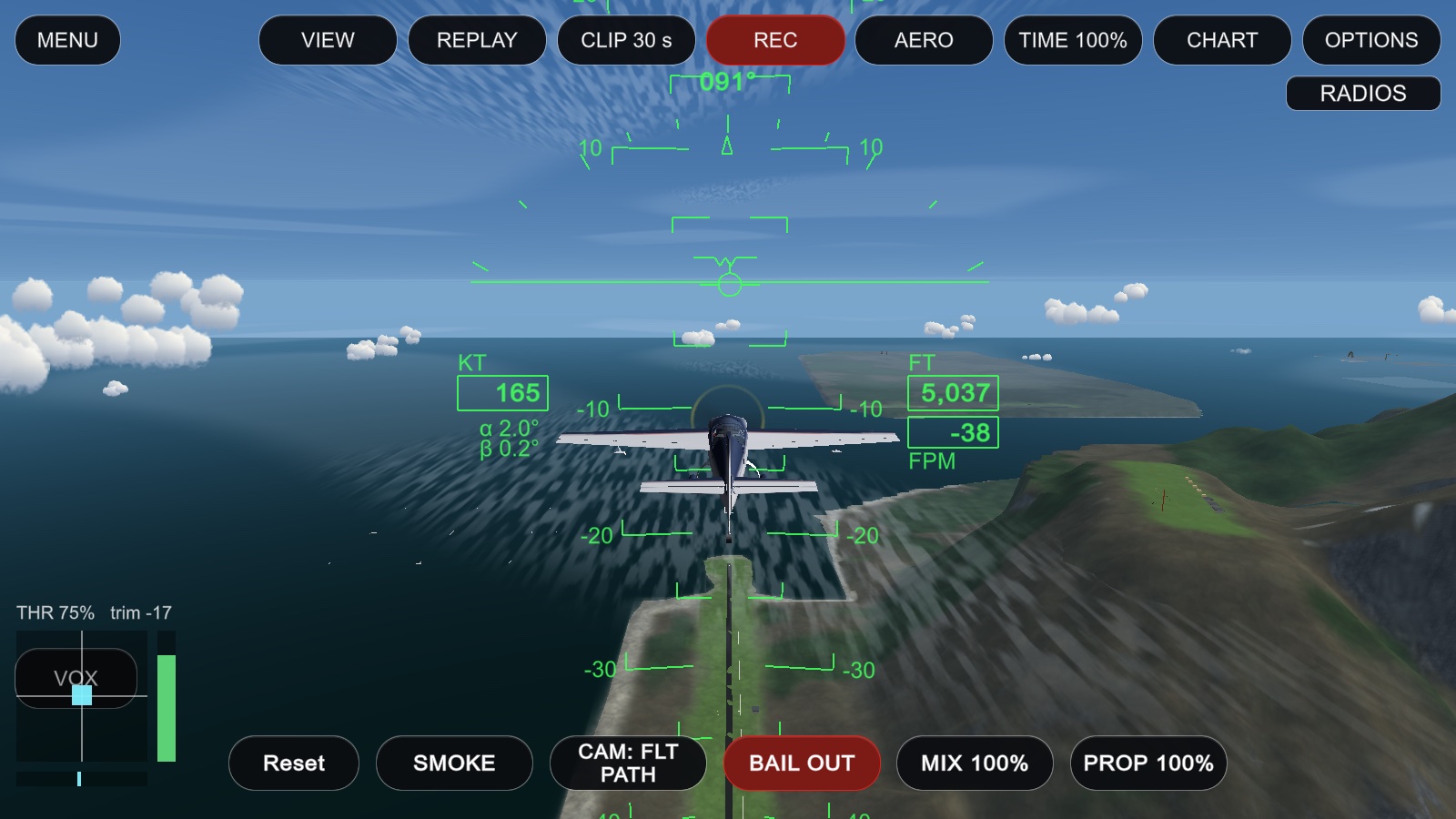
- Left box: airspeed. Right box: altitude in feet, with climb or descent rate under it.
- Top: heading. Ladder: the horizon and your pitch.
- Circle with wings: where the aircraft is really going. -W-: where the nose points. A big gap between them means a stall is near.
- Bottom band: RPM, throttle, fuel.
More: The HUD and instruments.
Your first flight
Press the red FLY NOW. You are in the Glider Trainer, in the air. Fly; press Reset to start again. Pick other aircraft on the AIRCRAFT page.
Taking off
- LOCATION › START › On the runway, then FLY NOW.
- Full throttle. Keep straight with the rudder.
- As speed builds, ease the stick back and let it fly off. Climb at a steady speed.
A glider on the runway is hooked to a tow plane: follow it, then RELEASE (G).
Landing
- Power back; descend toward the runway at a steady speed. Flaps if fitted; spoilers in a glider.
- Just above the ground, raise the nose gently and hold it off.
- Keep straight, then brake.
- Stopped? Press Rate my landing for a Butter Meter score out of 100.
Practise with LOCATION › START › On final.
Bailing out
BAIL OUT (or E). The parachute opens by itself after about three seconds; steer it with the roll control. Reset puts you in a fresh aircraft. There are no lives to lose. More: Bailing out.
Cameras
VIEW lists every camera; C or gamepad Y steps through them. Pinch or use the mouse wheel to zoom. REPLAY plays back the last ten minutes, and has the slow-motion Tire shot and the hand-flown drone. More: Cameras.
The full manual
aeroplayground.app/manual — every aircraft, airport, activity and setting, searchable, with an index and glossary.